
Coordinates
The name "Coordinates" is a double entendre for “Coordinating” a trip with friends and “Coordinates” for the next travel destination.
This name was created by one of my research participants and most highly voted for via. a post-usability test survey by other participants.

01
Discover
Problem Statement
Millennials find it tedious to plan trips with friends.
They want to collaborate efficiently when planning trips,
but find it hard to communicate and collaborate across different platforms.
Research Methods
45 survey responses
10 one-to-one interviews
10 moderated usability tests
02 competitor analyses
02
Define
Affinity Mapping
After each survey and interview, I synthesized the data into this beautiful affinity map.
I could then identify the main clusters I wanted to focus on in creating my user persona.

Empathy Mapping
I then reorganized the insights into what people see, hear, say and do.

User Persona
Meet Keira, my user persona created from my user research.
She's 28, a Recruiter based in Sydney, and is very much an organized lady.
Her 4 main pain points included:
-
Frustration in locking in a date with her group
-
Clutter of information across different platforms
-
Differences in budgets and preferences
-
Lack of collaboration and responses from her group

User Journey
I then mapped out her journey in planning a trip.
This helped me to understand what, when, how, and why users undertake certain actions throughout the process.
Mapping out each touchpoint and her emotions at each stage helped me to identify potential opportunities to address her pain points.

03
Develop
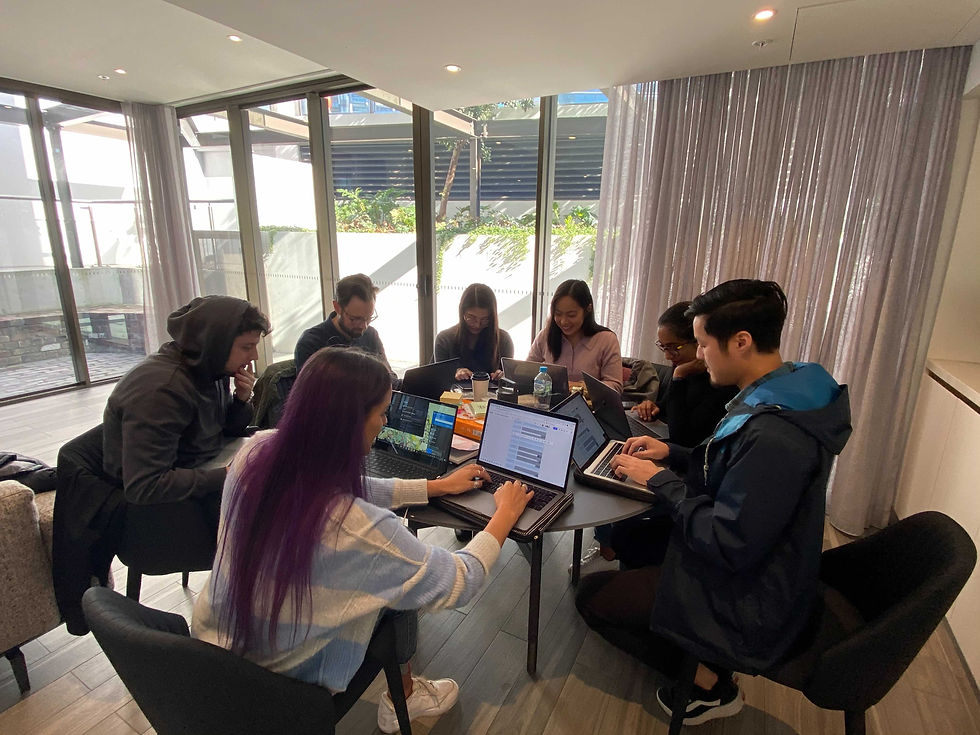
Ideation Workshop
I then ran an Ideation Workshop with 7 Keira's.
This involved:
-
Introducing the problem statement, user persona and user journey
-
Brainstorming & voting for"How Might We" (HMW) statements
-
Crazy 8's to address our HMW
-
Voting on most feasible & desirable features on an MVP Matrix.
How Might We?
"How might we help Keira and her friends collaborate effectively and plan efficiently?"
MVP Matrix
With the MVP Matrix generated from my Ideation workshop, I used this to guide my initial design.
Focusing first on high value and high feasibility features that my participants voted on.


Low Fidelity Wireframe
Then begins the fun part.
Lo-fi sketches!
After a few initial usability tests, moved on to my med-fi wireframe on Figma.
User Flow
I then organized the new design into a clearer path that users would take when interacting with the app, ensuring that users could navigate easily and move flexibly with each step.


Medium Fidelity Wireframe
With minimal text, colour and use of logos & icons, I designed a med-fi wireframe, incorporating previous feedback.
The grayscale and minimal text left some room for users' imagination throughout usability testing and allowed me to identify obvious changes I needed to make before moving on to high-fidelity prototyping.

Pivot Moments
This is my favourite part. Allowing my initial assumptions & perceptions to be proved wrong by my research.
Some changes I made based on user feedback.
-
Initially, I planned to let users decide if they wanted to help with planning or simply vote for options. My interviews revealed that this was confusing, unnecessary and unhelpful in encouraging collaboration.
-
Scrapped a messaging feature as interviewees expressed that it would be another avenue to check messages.
-
Removed a travel booking (eg. flights, car hire) feature in the app as it wasn’t feasible within the scope of this project. But this would definitely be something I’d like to explore if time allowed.
04
Deliver
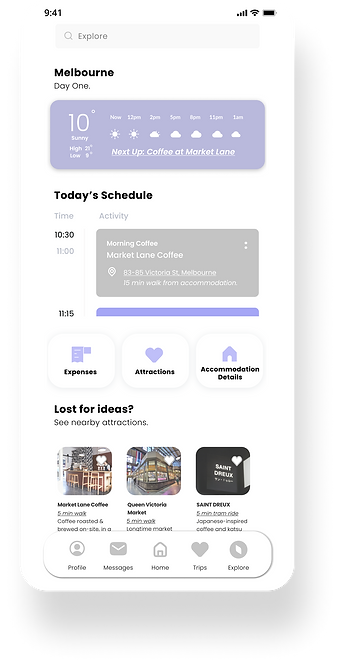
High Fidelity Prototype
I created a mood board where I asked users to compare 3 different designs, I realized that people wanted something flat, simple, with minimal colour – especially when dealing with a lot of information in trip planning.
After 2 rounds of iterations and testing with 10 Keira's my high-fidelity prototype was born!

But have I answered Keira's pain points?
After each usability test, research participants completed a post-testing survey which allowed me to gather data on whether or not Keira's pain points have been validated by the solution.
On average, participants rated Coordinates (out of 10):
9 in making availability-finding more efficient
8 in decreasing clutter by centralizing information
10 in helping the group come to a decision
9 in encouraging collaboration in the group
Personal
Reflections
I was challenged by:
-
Interviewing was something that was new and tiring for me – talking to people for hours on end. I learned to space it out a little in the future!
-
Figuring out my MVP and not biting off more than I could chew with the initial excitement of designing something.
I enjoyed:
-
Research and how refreshing it was to see so many different perspectives.
-
Being proved wrong by research. It was so satisfying when I was reminded that my way isn’t the best for the user.
-
The power of group synergy. The Ideation workshop was so intense, but so rewarding when you walk away with so much more inspiration and so many more new ideas.
-
The art of designing for the user. I immensely appreciated the design process. From sketching and designing on Figma, to testing and making iterations after each round of testing. As someone from a background of designing for subjectivity and aesthetics, it’s so refreshing to design something that is backed by data, that’s for the user and changes with the user.